
How to enable live translation
Ce contenu n’est pas encore disponible dans votre langue.
Step-by-Step Guide: Activating Live Translation in Seconds
Section titled “Step-by-Step Guide: Activating Live Translation in Seconds”With our advanced live translation feature, XpertEye calls can be seamlessly translated into your preferred language—whether as subtitles (speech-to-text) or spoken words (speech-to-speech).
- Understand and be understood effortlessly: Speak naturally in your language and let our AI do the rest.
- Real-time voice translation: Hear your interlocutor’s words in the language of your choice, without delay.
- Subtitles for greater clarity: Display translated subtitles on-screen for greater accuracy and accessibility.
- Ideal for calls with field agents - Enjoy smooth communication, even in noisy environments or when using smart glasses.
- In “Live translation”, we currently support 24 languages: Arabic, Chinese (simplified/traditional), Czech, Dutch, English, French, German, Hindi, Hungarian, Italian, Japanese, Korean, Norwegian, Polish, Portuguese, Romanian, Russian, Slovenian, Spanish, Tamil, Thai, Turkish and Ukrainian.
How do I activate Live Translation?
Section titled “How do I activate Live Translation?”To activate the Live Translation / Speech-to-Speech functionality, simply contact your dedicated project manager or AMA representative, who will enable the feature for your company.
How much will it cost?
Section titled “How much will it cost?”Each activation of Live Translation during a call consumes
an additional****floating license.
Example: For 2 users in a call – one speaks French, the other English.
- If only 1 user activatesthe translation button → 3 licenses are used.
- If the 2 users activatethe translation button → 4 licenses are consumed.
How to enable the feature ?
Section titled “How to enable the feature ?”1️⃣ Click on the “Live Translation” button. 2️⃣ Enable “Translation” for Speech-to-Text (Subtitles). 3️⃣ Enable “Voice Synthesis” for Speech-to-Speech.
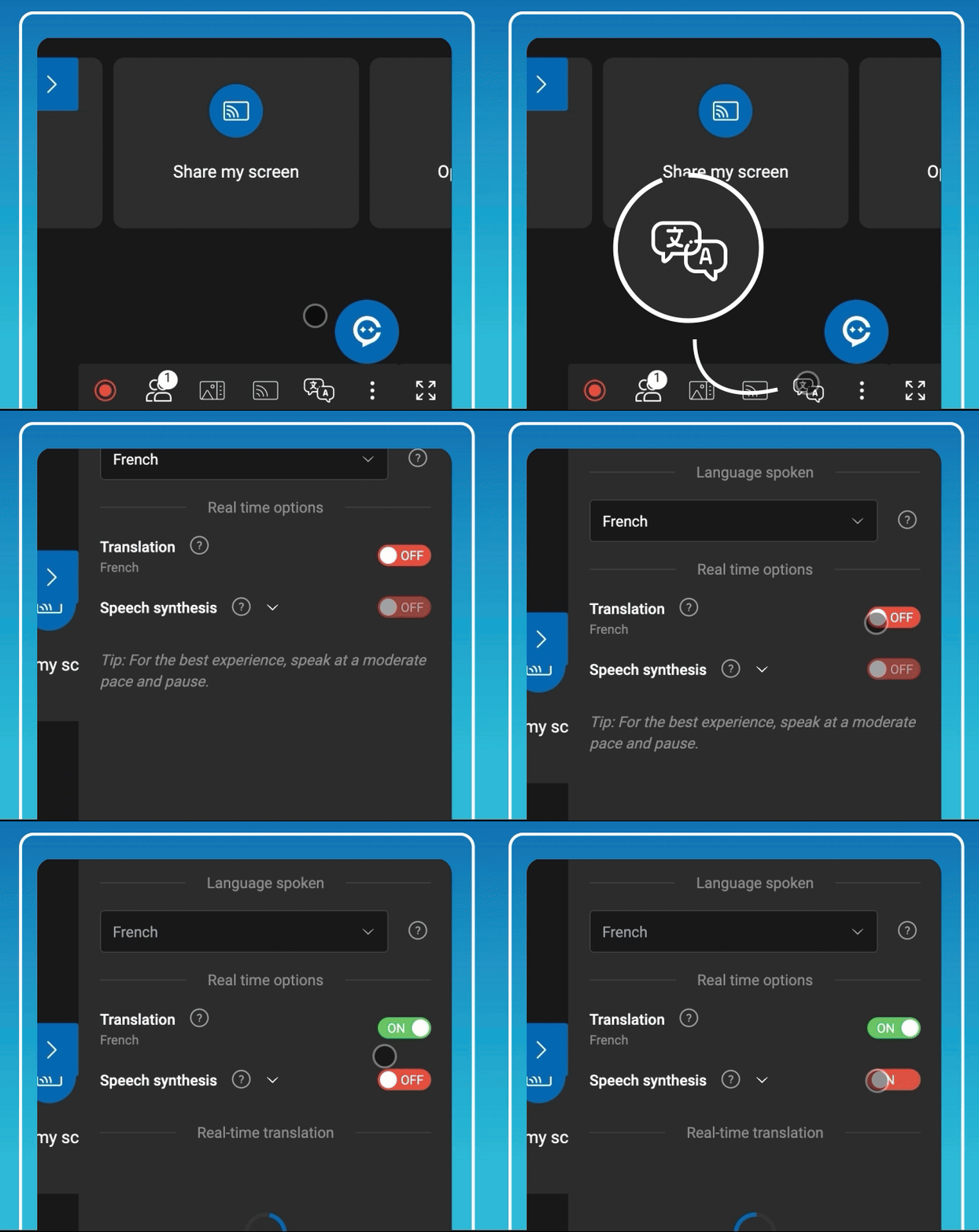
When Live Translation is enabled, all participants, except those using smart glasses, will be asked to select their spoken language to ensure optimal translation quality.
Additionally, participants can enable Voice Synthesis within Live Translation, allowing translated text to be played as audio during the call. When Voice Synthesis is active, the original user’s audio is softened to ensure clarity.
Our translation feature adheres to stringent security standards, including GDPR compliance and ISO 27001 certification, to ensure the privacy of your conversations.
Additionally, 100% of data is processed exclusively on AMA servers, guaranteeing full control and security over your information.
Tips and best practice for optimal use
Section titled “Tips and best practice for optimal use”✔️ Pause briefly at the end of each sentence – This improves translation accuracy.
✔️ Headsets help understanding – Wear headsets and improve your translation experience.
✔️Use custom dictionary and benefit from company-specific naming convention integration.